Showing posts with label BLOG TIPS. Show all posts

Tuesday, February 7, 2012

MERGE Google+ And Blogger/Adding Linky Follower widget

I have just merged my Blogger Account with Google+ due to the upcoming change in GFC (Google Friend Connect). 

I am very new to blogging and I am not in the Flow of this yet. To loose the blogs I follow would sadden me, I love reading their blogs and looking at their amazing creations. 

To me it is like reading a Newspaper in the morning (but I'd much rather read blogs and pin than read how the world and the government is in a mess right now, its quite depressing!). 

I DO NOT want to loose my FEW beautiful followers.

All of this changes in GFC and new ways to get connected made everyone panic and confused.
Specially on how they can save the friends they have kept in touch with for years.

Everyone have put a lot of effort into making each blogs unique, entertaining and informative and we have to KEEP that connection. It takes a lot of time to gain followers and friends afterall. 

Here is to MERGE Google+ and Blogger account:
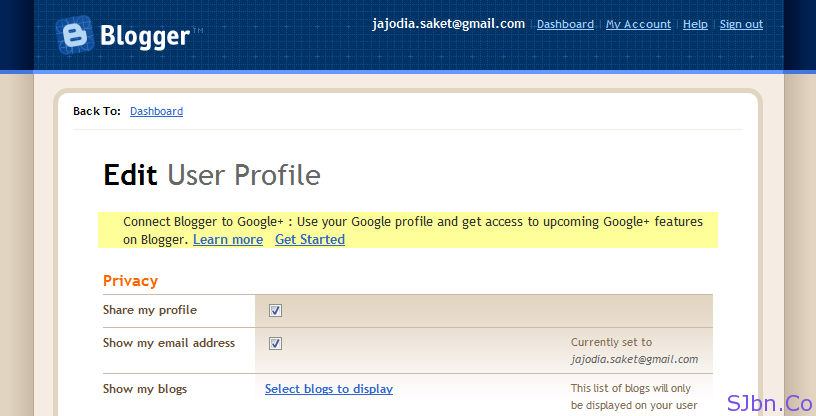
  1. Go to Draft.Blogger.com/edit-profile.g (if not logged in then login to your Blogger account)
  2. Then click on Get Started from yellow notification box
  3. Edit User Profile - Connect Blogger to Google+
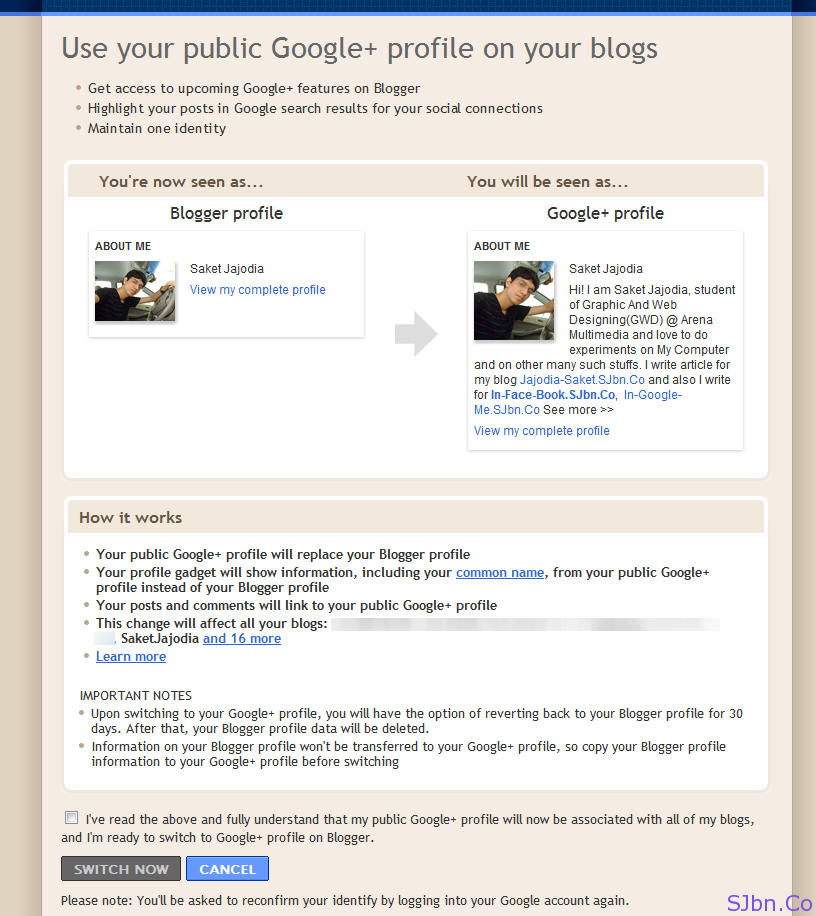
  4. Select the check box the end of the page and click on SWITCH NOW button
  5. Use your public Google+ profile on your blogs
  6. Now they will ask you which all blog of yours you would like to add in your Google+ Profile’s Contributor to box (appears in ride side in your Google+ profile)
  7. Click on ADD BLOGS and if you would not to add any blogs then click on SKIP button
  8. You're now connected to Google+
Now your Blogger profile will get redirect to your Google+ profile, all new comments you will make will have your Google+ profile’s real name and link instead of your Blogger profile, you will also get Author information in search results for your blog.
If you want to use different name in your Blogger profile and Google+ profile and want to continue the same way then you should not switch your Blogger profile to Google+. In case if you did and want to revert back you can do it anytime by going to Draft.Blogger.com/revert-profile.g.


To Add Linky Follower widget on your sidebar:

Heather, Brett & other bloggers created a NEW subsciption platform called Linky Followers. Stop by At the Picket fence to read on the step by step and detailed explanation @ Linky 101.


I HOPE YOU WOULD FOLLOW ME BECOZ I FOR SURE WILL FOLLOW YOU!

BEAUTIFUL DAY TO EVERY BEAUTIFUL WOMEN!

Friday, January 13, 2012

HOW TO.....make flash glitter text.

Did you like my new header for valentines? Here's how to do it.

I have another widget I wanted to share with you Luvleh Leighdeez!
 Yup! I have just got done posting my scrolling text tutorial (please feel free to check it out). 

Now for the next one, I wanted to share with you where to get flash glitter text.

This is the link to the website:

I use the glitter text as my header. I think its stylish but you can adjust the style or effects according to your taste.

This is how it should look like when you pull up the page:


I love this website because it has a lot of different style of glitter for the texts.
They have enough selection of fonts you can play with.

To create:

Type out the words on the text box & the rest of the stuff you want to customize, size, glitter design, fonts style.
Dont forget to check or uncheck the boxes to achieve the effects you want.
 Adjust the size of the fonts. 
I used 100 on mine.
I am using 3 column minima

At the bottom copy HTML code
Go to blogger--->design--->add gadget--->look for HTML/javascript--->paste the code--->save--->position the gadget to where you want the glitter text to appear on your page.
Mine appears like this.
To use it as header (like mine):
 Go to blogger--->design--->choose the gadget on the upper part of page where the header is--->click on add gadget--->look for HTML/javascript--->paste the code--->save 
On the same page go to edit header--->upload any image--->on the placement part, click on instead of title and desciption.

This is how it should look like:


If you find this tutorial helpful please do share to everyone and dont forget to link it back to my page.
Have fun decorating!

HOW TO....put scrolling text on your page.

 Hello Lovely ladies!
It is a wonderful chilly morning. I had fun modifying my page yesterday.
Finally I have something I can share with you.
It may not be about decorating the house, or arts, or crafts, not cooking, but I hope you would enjoy playing with it and applying it on your pages.

Today I am going teach you how to put scrolling texts on your page.

I ran a search for scrolling text and I am sharing with you this website with lots of other widgets you can use to make your page interactive and entertaining.

The websites I use:

1. http://freecodesource.com/index.php?page=myspacegenerators/marqueegen

This is how it should look like:


Type out the words on the text box & the rest of the stuff you want to customize, size, direction of scroll, fonts, color etc.
On the right side click on generate code and copy the code. 
Go to blogger--->design--->gadget--->HTML--->paste the code--->save--->position the gadget to where you want the scrolling text to appear on your page

------------------------------------------OR----------------------------------------

2. http://www.myspacegens.com/handler.php?gen=marquee


Type out the words on the text box & the rest of the stuff you want to customize, size, direction of scroll, fonts, color etc.
At the bottom click on submit 

(this is how the next step should look like)

Copy the code. 
Go to blogger--->design--->gadget--->HTML--->paste the code--->save--->position the gadget to where you want the scrolling text to appear on your page

 This is how mine look like:


If you find this tutorial helpful please do share to everyone and dont forget to link it back to my page.
Have fun decorating!

About me

FIRST NAME?    Luisa May   WHO WERE YOU NAMED AFTER?    No one, My Aunt named me WHEN DID YOU LAST CRY?    Palm Sunday, Potter...